 for CorelDRAW
Latest version: 6.10.25.35
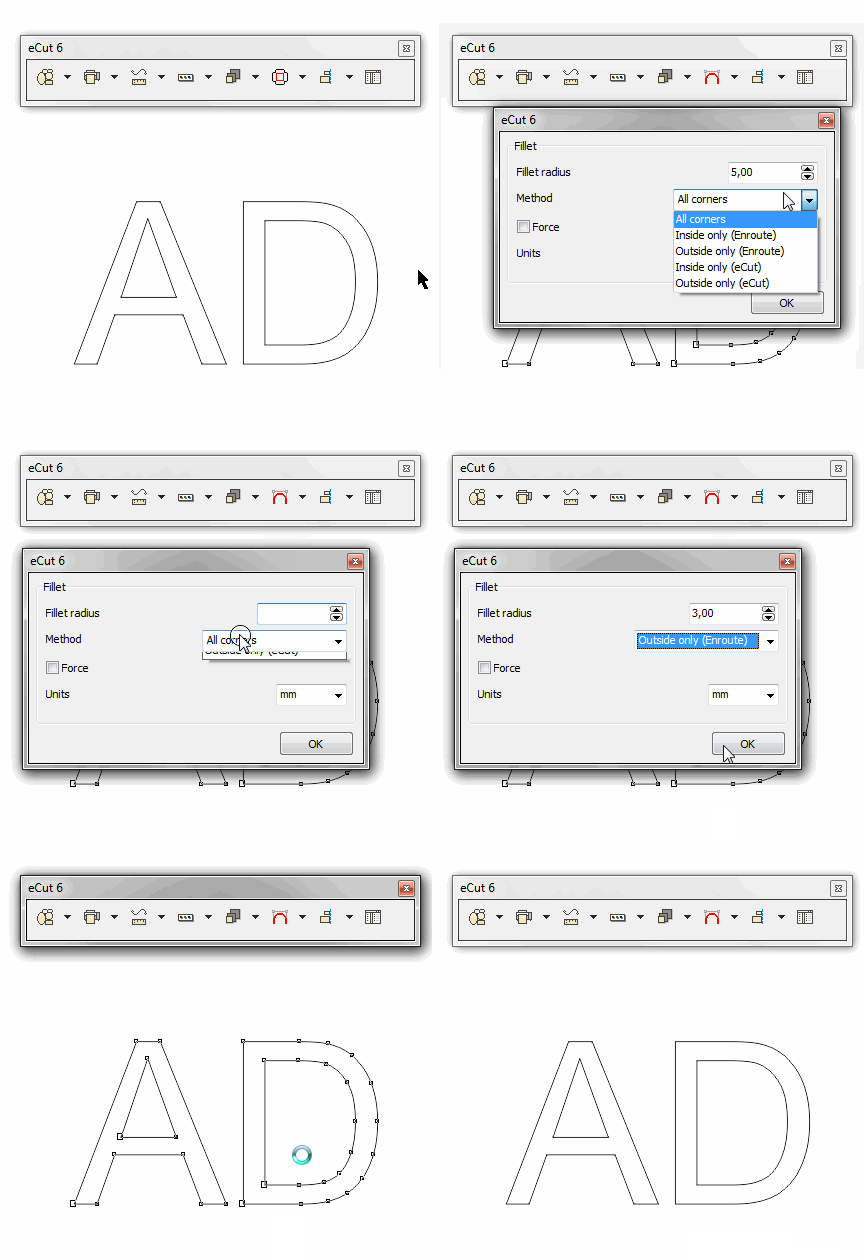
Great function for CNC machine users - it allow you to round corners according to selected method.
Use this function to fillet curve or node.
There is 5 methods how to fillet curve - select one You need.
Use 'force' options when there are many nodes in corners...
But be careful - there can be errors in some cases..
This feature is also available from CAD functions window.
eCut 5 (old)
rStones
AI nesting
eCut for Illustrator
eCut for MAC OS
[Nesting][Cut/Plot + contour cutting][Perimeter][Area][Cost][Time][Weeding lines][Multiply][Rectangle nesting][LEDs][Neon][Draft][Central line][Smart divide][Connect opened paths][Fillet][Find intersections][Find duplicates][Search shapes][Create SignBox][Create lines][Create grid][Create cropmarks][Reduce nodes][Effects][Edge roll][Contour cutting file][Separate curve][Remove duplicated edges][Slice object][Eyelets][Create carrier (boundbox)][Align and Distribute][Set size][CAD functions][DXF Export][Replace][Reference scale][Create bridges][Variable][Hotwire cutting][Route optimizer][Finger joint box][Finger joint shape][Volume calculator][Door panels]
Copyright © 2007 eCut.